> ## Documentation Index
> Fetch the complete documentation index at: https://help.texterchat.com/llms.txt
> Use this file to discover all available pages before exploring further.
# Authentication
> Bearer tokens and scopes
ll requests require a **Bearer token** in the `Authorization` header:
```bash theme={null}
curl https://YOUR_PROJECT.texterchat.com/server/api/v2/labels \
-H "Authorization: Bearer YOUR_API_TOKEN"
```
## Creating a token
In your Texter environment:
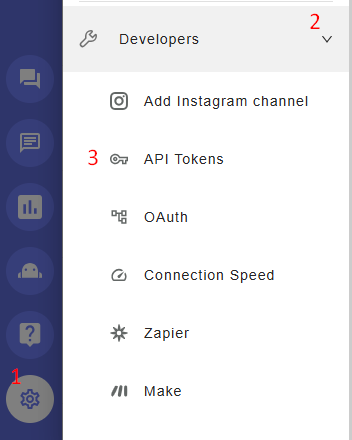
1. Click the **gear icon** → **Developers** → **API Tokens**
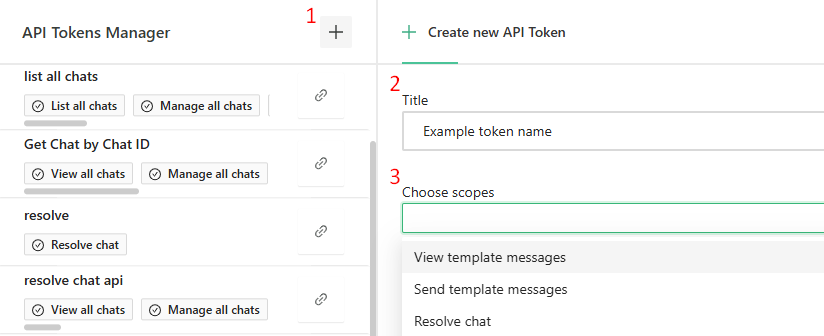
2. Click the **plus icon**, give the token a name, choose the relevant scopes, and save
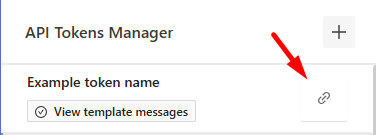
3. Click the **link icon** to copy the token
 The token is shown once - store it securely. Anyone holding the token can act on your inbox within its scopes.
## Scopes
When creating a token you assign it **scopes**, which define which parts of your inbox the token can access. Every endpoint in this reference lists its required scopes at the top of its description - a token must include **all** scopes an endpoint lists.
| Scope (as shown in Texter) | What it unlocks |
| ---------------------------------- | ------------------------------------------------------------------------------------------------------------------- |
| Send template messages | Send Template Message |
| View template messages | List All Templates |
| Manage WhatsApp templates | Create / update / delete templates, localizations, submit for approval |
| Manage all chats | Assign / resolve chats, update chat properties and CRM data, manage labels in chats, template subscribe/unsubscribe |
| List all chats | Search Chats, list unsubscribed users |
| View all chats | Get Messages of a Chat, Generate Public Media URL |
| Send session message | Send a Message to Chat, Get Chat by Chat ID |
| Manage labels | Create / update / delete labels |
| Manage channels | Resolve channel health problems |
| View all files | Generate Public Media URL |
| View scenarios | List event subscriptions |
| Create scenarios | Import (create) event subscriptions, create/copy scenarios |
| Edit scenarios | Scenario drafts and revisions (advanced) |
| Delete scenarios | Delete event subscriptions |
| Activate/inactivate scenarios | Pause / resume event subscriptions |
| Manage scenarios on behalf of user | Required together with the other scenario scopes for subscription endpoints |
| View scenarios runs | List Scenario Runs (webhook debugging) |
| View quick replies | List quick replies |
| Manage quick replies | Create / update / delete quick replies |
A few read-only endpoints - **List All Labels**, **Get Label Data** and **List Channel Health Problems** - work with any valid token, regardless of scopes.
## One token or many?
Both approaches work:
* **One token per integration** with all the scopes it needs (simplest).
* **One token per area** (templates, chats, events, and so on) following the suggested scope bundle listed on each group's overview - slightly safer because each token can do less.
## What's next
All status values, type enums and the which-ID-goes-where cheat sheet live on [Enums & Common Fields](/he/api-reference/enums).
The token is shown once - store it securely. Anyone holding the token can act on your inbox within its scopes.
## Scopes
When creating a token you assign it **scopes**, which define which parts of your inbox the token can access. Every endpoint in this reference lists its required scopes at the top of its description - a token must include **all** scopes an endpoint lists.
| Scope (as shown in Texter) | What it unlocks |
| ---------------------------------- | ------------------------------------------------------------------------------------------------------------------- |
| Send template messages | Send Template Message |
| View template messages | List All Templates |
| Manage WhatsApp templates | Create / update / delete templates, localizations, submit for approval |
| Manage all chats | Assign / resolve chats, update chat properties and CRM data, manage labels in chats, template subscribe/unsubscribe |
| List all chats | Search Chats, list unsubscribed users |
| View all chats | Get Messages of a Chat, Generate Public Media URL |
| Send session message | Send a Message to Chat, Get Chat by Chat ID |
| Manage labels | Create / update / delete labels |
| Manage channels | Resolve channel health problems |
| View all files | Generate Public Media URL |
| View scenarios | List event subscriptions |
| Create scenarios | Import (create) event subscriptions, create/copy scenarios |
| Edit scenarios | Scenario drafts and revisions (advanced) |
| Delete scenarios | Delete event subscriptions |
| Activate/inactivate scenarios | Pause / resume event subscriptions |
| Manage scenarios on behalf of user | Required together with the other scenario scopes for subscription endpoints |
| View scenarios runs | List Scenario Runs (webhook debugging) |
| View quick replies | List quick replies |
| Manage quick replies | Create / update / delete quick replies |
A few read-only endpoints - **List All Labels**, **Get Label Data** and **List Channel Health Problems** - work with any valid token, regardless of scopes.
## One token or many?
Both approaches work:
* **One token per integration** with all the scopes it needs (simplest).
* **One token per area** (templates, chats, events, and so on) following the suggested scope bundle listed on each group's overview - slightly safer because each token can do less.
## What's next
All status values, type enums and the which-ID-goes-where cheat sheet live on [Enums & Common Fields](/he/api-reference/enums).